Play
Type a formula and the GPU paints every pixel at once
The Book of Shaders teaches GLSL in a live editor where each pixel's color is computed in parallel from its own coordinate. Change a line, the whole image recompiles.
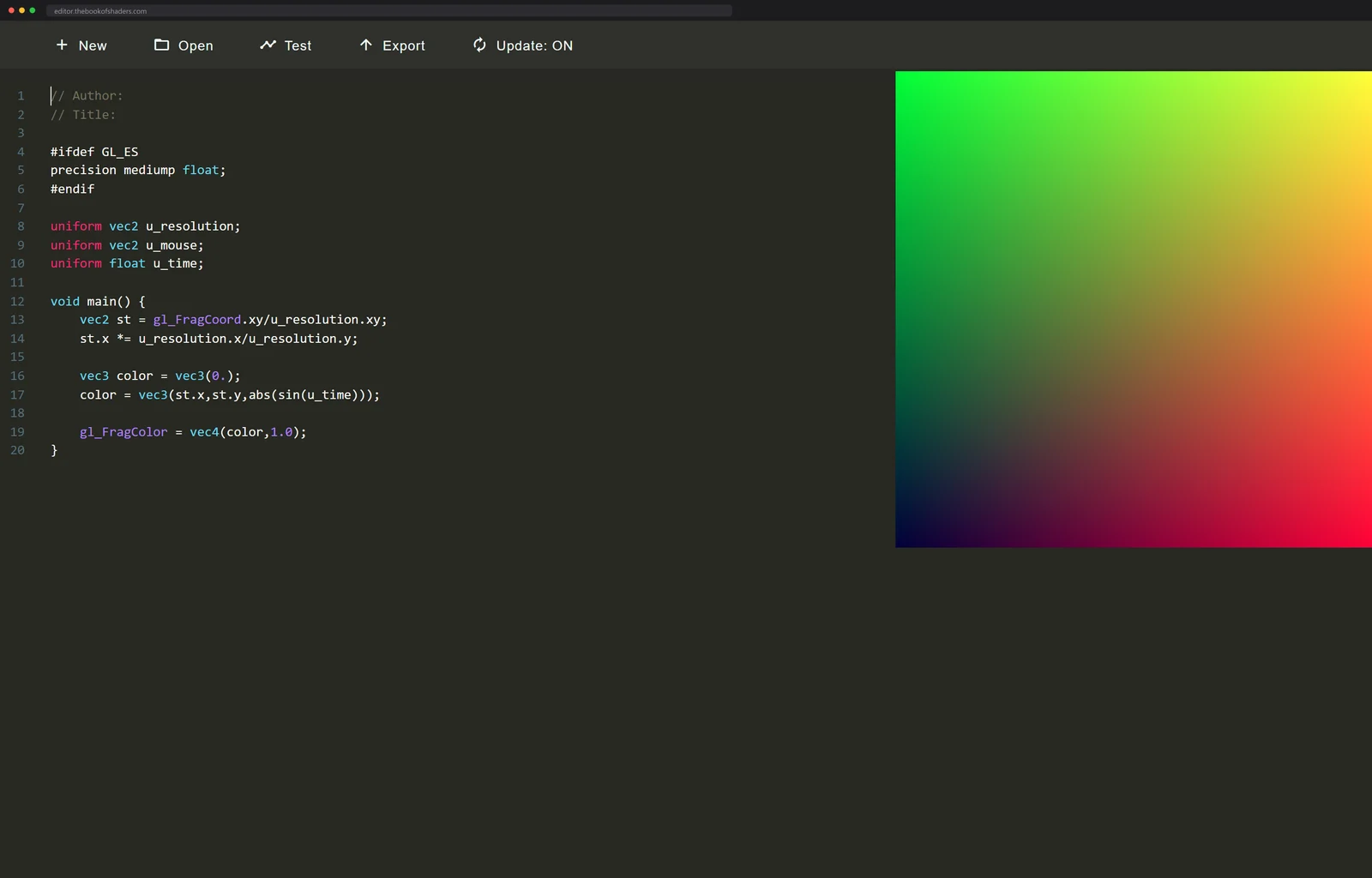
On the right, a smooth gradient of green, yellow and magenta, gently
pulsing. On the left, the whole program: a dozen lines of GLSL, one
main function, one line that sets a color from a pixel's position and
the clock. Change a number and the gradient changes while you type.
The Book of Shaders, by Patricio Gonzalez Vivo and Jen Lowe, is a guide to writing fragment shaders in which every example is a live editor. It has been going since 2015, sits on around seven thousand GitHub stars, and its homepage lists thirteen translations, which tells you how many people needed exactly this door into graphics programming. Nineteen chapters climb from setting a single color to raymarching 3D scenes, through algorithmic drawing, generative noise and image processing on the way.
The repository receipts back the longevity up: 755 forks, around 1,400 commits, still landing. I went looking for a reader count and there is none to find; the book is free, unmetered, and keeps no public analytics, so the stars are the only crowd number it has.
One tiny program, every pixel at once
The idea it teaches is the one that reorganizes how you think about
drawing. A fragment shader is a tiny program that runs once for every
pixel, all of them at the same time on the GPU, and it gets almost
nothing to work with: the pixel's own coordinate, a clock, the mouse.
From that it has to decide a color. No shapes, no brush strokes, just
math answering the question "given where you are, what color are you." A
whole rainbow is color = vec3(position, abs(sin(time))). Patterns come
from step and smoothstep, texture comes from noise, and by the end of
the book that same trick builds 3D scenes through raymarching.
The scale deserves saying out loud. A 1080p canvas is 2,073,600 pixels, so at sixty frames a second your GPU runs that little program well over a hundred million times every second without complaint. The book's examples feel instant because they are, in a way almost nothing else you will ever program gets to be.
The later chapters are where the compounding shows. The noise material alone walks from value noise to gradient noise to cellular noise, each one a function you can read in full and poke at on the page, and the raymarching finale spends all of it again as surface detail for scenes that never touch a triangle. Nothing is imported. Every tool you end the book holding, you watched get built.
This is also the single most transferable skill the browser can teach you right now. The same fragment-shader model runs the water in every modern game, the background blur on your video calls, and the filters on your phone's camera. GLSL is just the dialect where you can learn it with nothing installed.
The book itself is a machine
The pages are the second sighting, because there is no build step hiding anywhere. View source on any chapter and the machinery is all there to read, which means the book teaches the way it is made: the medium is the exact technology under instruction.
Every code block is a running WebGL
context powered by
glslCanvas, a
small MIT-licensed JavaScript library Gonzalez Vivo wrote for the
book: hand it a canvas element and a fragment shader and it compiles
the GLSL on your GPU and feeds it the uniforms the exercises depend
on, u_time, u_resolution and u_mouse.
The editable boxes ride the same author's glslEditor on top of that, which is why a change to the code is a change to the picture with no run button in between. The book never shows you a screenshot of a shader. It hands you the shader.
The thirteen translations on the homepage undersell it too; the repository carries roughly fifteen language directories with more in progress, Japanese and Korean and Ukrainian among them, every one contributed by readers. A graphics text does not collect volunteer translators at that rate unless it is the copy everybody passes around. The repo also builds the whole thing for offline reading, exports to PDF and EPUB for printing, and runs on a Raspberry Pi, which is the least glamorous and most telling feature: this book is built to reach people who do not have a gaming rig.
One author, a whole workbench
Gonzalez Vivo kept building doors after the book shipped, and the star counts say people keep walking through them:
- glslViewer, a console OpenGL sandbox at 5,300 stars that runs shaders with no browser at all, on Linux, macOS, Windows, a Raspberry Pi, or compiled out to WebAssembly
- lygia, a 3,500-star shader library that packages the book's recurring moves, the noises, the SDFs, the easings, as granular include files for GLSL, HLSL, Metal, WGSL and CUDA, with adapters for Unity, Unreal, TouchDesigner and Three.js
The pattern repeats across all of it: lower the setup cost until the only thing standing between you and the picture is the math.
Once this clicks, the fluid dynamics you can smear with a mouse and the dot grids elsewhere on this site stop looking like separate tricks. They are all the same move: a small program, run per pixel, all at once. The brutal-constraint end of the same hobby is the 140-character animations of dwitter, one function per frame with every byte rationed.
Where to type your first one
The book is its own tutorial, so the door is short. Start at chapter
one and edit everything. A good first vandalism: take the rainbow
example, swap sin for fract, and watch the gentle pulse become a
sawtooth strobe. The moment a one-token edit changes the whole
screen's behavior, the mental model has landed, and that moment
usually arrives inside the first five minutes. When the inline boxes feel small,
editor.thebookofshaders.com is
the same live editor full screen, and glslCanvas will put any shader
you finish onto a page of your own with a script tag and a canvas
element. When your shaders outgrow copy-paste, lygia is the standard
library already waiting for them.
The same idea shrunk to one line: a formula animating two hundred and fifty-six dots.
Next up
Dozens of operating systems, each one bootable in a browser tab