Play
Drag your cursor and the GPU solves real fluid dynamics
WebGL Fluid Simulation runs the Navier-Stokes equations on your graphics card, twenty pressure iterations a frame, in about fifty kilobytes of JavaScript.
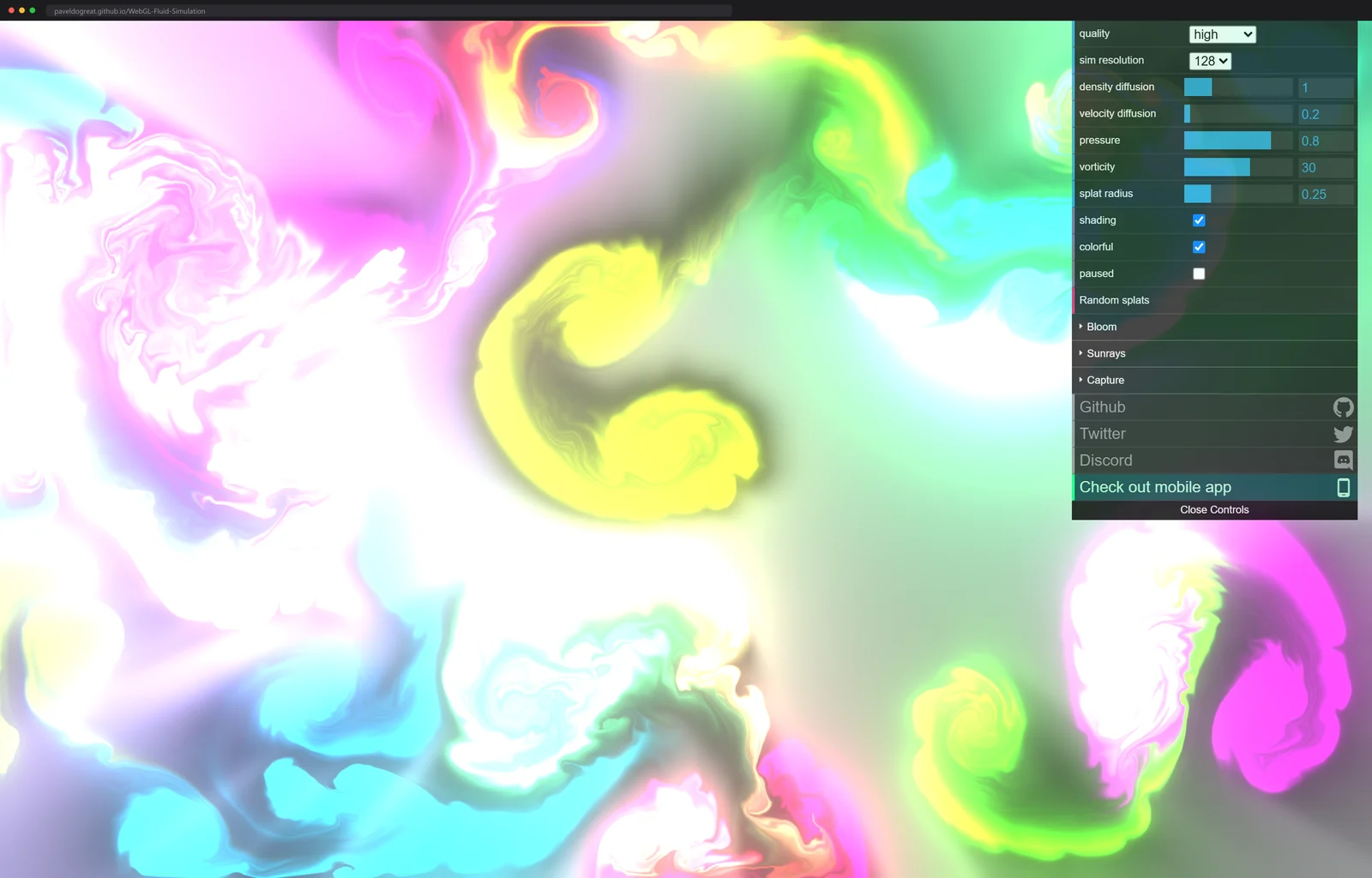
You move the mouse and a rope of magenta uncoils behind it, curls back on itself, drags a streak of cyan into the fold. Let go and the whole screen keeps churning like weather.
WebGL Fluid Simulation, by Pavel Dobryakov, is not painting those swirls with canned animation. It is solving the incompressible Navier-Stokes equations, the same math that describes real smoke and water, on your graphics card, once for every frame. The ink is just a dye field being carried along by the velocity it computes.
The receipt is the size. The whole simulation is one JavaScript file,
51 kilobytes by my download,
MIT-licensed and sitting on more than sixteen thousand GitHub stars.
The moment it loads it fires between five and twenty-four random ink
splats, a range the source rolls with Math.random() * 20 + 5, so the
screen is already alive before you touch it.
What the GPU does every frame
The fluid's entire state lives in a few floating-point textures, one for velocity and one for dye, and each frame a short stack of fragment-shader passes rewrites them in place.
Advection runs first: every pixel traces backward along the flow to see what is drifting into it, carrying velocity and ink downstream in one cheap step. Vorticity confinement follows, putting back the small curls that numerical error keeps smoothing away.
Each pass reads one texture and writes a second copy, then the two swap roles for the next pass, ping-pong style, because a GPU will not read and write the same texture in a single pass. The whole simulation is that swap, repeated a dozen ways, sixty times a second.
Then the physics gets enforced. A
Jacobi pressure solve
runs twenty passes per frame, PRESSURE_ITERATIONS: 20 in the config,
forcing the field incompressible before a final pass subtracts the
pressure gradient. It is Jos Stam's stable-fluids method as Mark
Harris laid it out in NVIDIA's GPU Gems chapter 38, ported pass for
pass into WebGL. The GPU runs the same tiny program on every pixel at
once. That is the whole speed trick.
The prettiness has a separate trick. Velocity is simulated on a grid
only 128 cells across, while the dye rides its own texture at 1024, so
the physics stays cheap and the ink stays crisp. On phones the script
drops the dye to 512 and switches the sunrays pass off; it asks for
WebGL2 with EXT_color_buffer_float, falls back to WebGL1 with
half-float texture extensions, and that fallback ladder is why a
mid-range Android holds full frame rate.
Turn on Bloom in the dat.GUI panel and eight stacked blur passes set the bright cores of the vortices glowing. The same panel exposes the honest knobs, sim resolution from 32 up to 256 cells, dye quality in four steps. The glow is not part of the physics. That is just showing off, and it earned it.
The twenty-five-year-old idea underneath
Every pass in that stack traces back to one person. Jos Stam published the stable-fluids method in 1999, and the reason it conquered real-time graphics is in the name: earlier solvers blew up when you pushed the timestep, his cannot, because the advection step looks backward along the flow instead of forward. You can drop frames, lag, alt-tab away, and the simulation stays bounded.
The trick has a proper name, semi-Lagrangian advection, and the intuition fits in a sentence. Instead of pushing material forward and hoping it lands inside the grid, each cell asks where its contents came from and samples that spot, so no value can ever overshoot. Engineers before 1999 bought stability by shrinking the timestep until simulations crawled. Stam bought it with a change of viewpoint, and real-time fluid went from impossible to a weekend project.
Stam then did the generous thing and rewrote it for people shipping games. Real-Time Fluid Dynamics for Games, his 2003 Game Developers Conference paper, walks through the whole solver with the working C source printed right in the text, each routine short enough to retype from paper. The architecture is two functions, a velocity step and a density step, each built from the same three moves: add the sources, diffuse, advect. Dobryakov's shader passes are those moves with new names. Thousands of smoke effects, title screens and music visualizers descend from those few pages.
The lineage to this sighting is two hops long. Harris's GPU Gems chapter took Stam's CPU solver and spread it across the GPU, one pixel per grid cell, in 2004. Dobryakov took that chapter and made it run on a phone. Same equations the whole way down.
Three more fluids, three different tricks
The technique has siblings all over the web, and I kept pulling the thread. The split that organizes all of them: pure grids give you infinite ink, particles give you surfaces and splashes, hybrids pay for both. Three earned a place here, and a teacher closes the section.
David Li's Fluid Particles is the one that looks wet. The source, MIT licensed at 1,200 GitHub stars, swaps the pure-grid approach for PIC/FLIP: a swarm of particles carries the fluid while a grid handles the pressure math, which buys you an actual surface, water that heaps and splashes instead of ink that swirls forever. Even the rendering is its own research project: the particles are shaded with spherical ambient-occlusion volumes, which is why the blob reads as one wet mass instead of a cloud of dots.
GPU Fluid Experiments by the developer haxiomic sits closer to Dobryakov's approach, at 3,100 stars of its own. It is written in Haxe and compiled out to WebGL, with the live demo still up, and its particular flex is how calm it stays at high resolution; the readme is candid that the code has aged and points at an active fork, which is its own kind of honesty.
There is even a maintained industrial descendant of this exact sighting. WebGL Fluid Enhanced rewrites Dobryakov's code in TypeScript and publishes it to npm as webgl-fluid-enhanced, with runtime configuration, custom palettes and a screenshot method bolted on. Only 84 stars so far, but it is the version you would actually ship on a client's landing page, and its readme opens by crediting the original. The lineage stays documented at every hop.
That last fact deserves a pause, because the original repo holds 91 commits total. Sixteen thousand stars, a maintained descendant on npm, and the whole thing fit in fewer commits than most projects spend arguing about their config files.
And for the version you build with your own hands, Matthias Müller's Ten Minute Physics has two episodes on exactly this: tutorial 17 writes a grid-based fluid solver in about 200 lines of code, tutorial 18 extends it into a FLIP water simulator that uses particles to tell air cells from water cells, and every episode carries a live JavaScript demo you can read the source of. Müller spent a career in physically based simulation research; the channel is him giving the whole toolbox away, roughly ten minutes at a time, exactly as advertised.
Where to start if you want one
Harris's GPU Gems chapter is free online, the whole 2004 book is, and it remains the clearest map of that pass stack. When you want to build one rather than read one, Jamie Wong's WebGL fluid simulation walkthrough derives the advection and pressure steps from the math, with live demos running in the page. And if GLSL itself is the wall, there is a book where every example is a live shader editor to climb it with first. Between all of those and Dobryakov's MIT-licensed source, the whole trail is marked.
If I were walking it today I would take it in this order: Harris for the map of the passes, Wong for the math behind two of them, Stam's C retyped by hand until the three moves feel inevitable, and only then the shader port. The ink is the reward at every step.
Same idea, different flavor: one line of code driving two hundred and fifty-six dots.
Next up
Summer is a website and it has a tracklist