Machines
A full Debian Linux boots in this tab with no server behind it
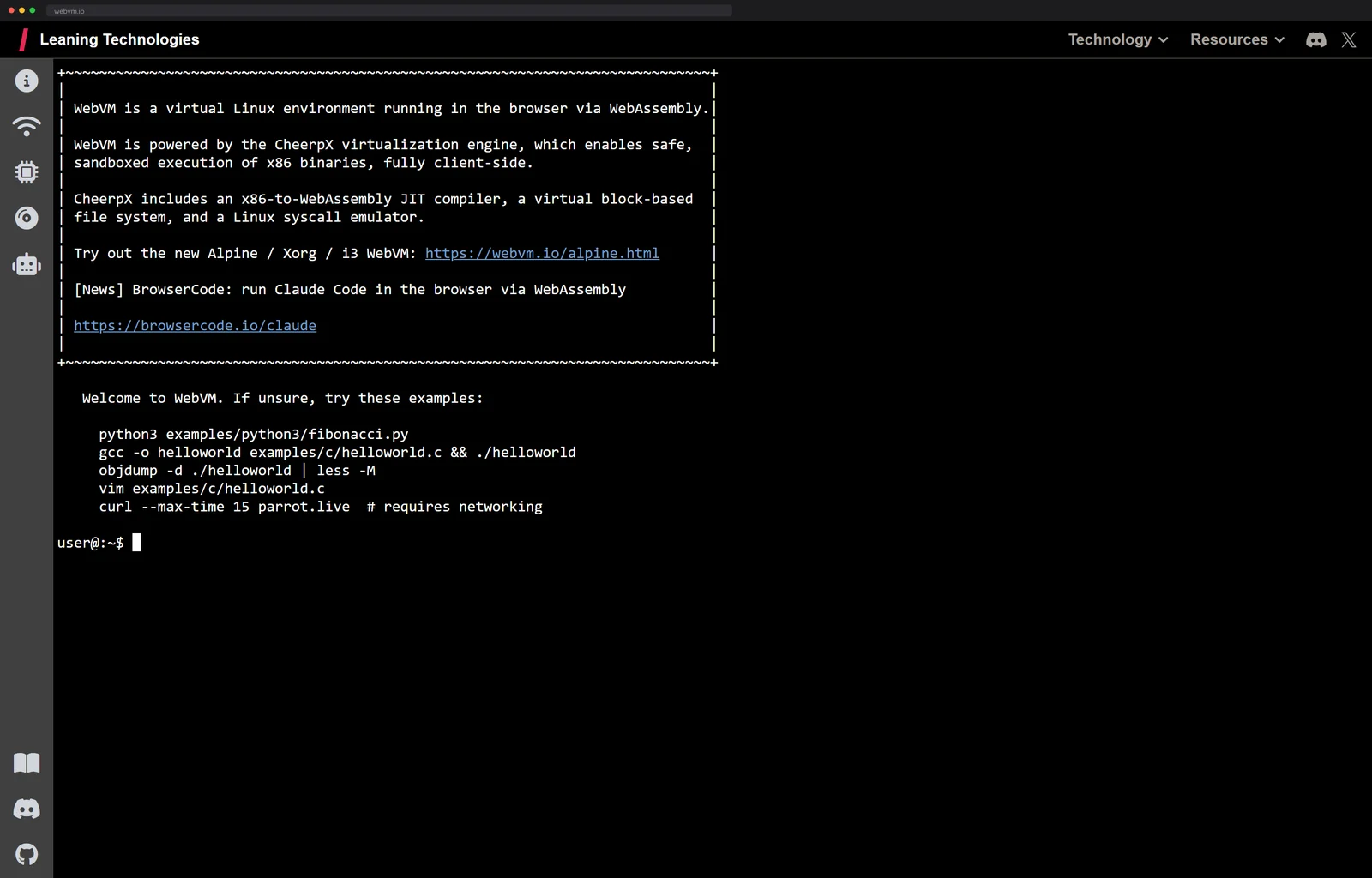
WebVM runs a real Debian userland client-side through CheerpX, an x86-to-WebAssembly JIT. You can compile C with gcc, and nothing on a server ran your code.
The tab finishes loading and there is a shell prompt waiting, blinking,
user@:~$. You can type gcc -o hello hello.c and it compiles. You
can run python3, open vim, poke around a real filesystem.
Here is the part that should stop you. None of that ran on a server.
WebVM, from Leaning Technologies, is a full Debian Linux userland executing entirely inside your browser tab. The project is Apache-licensed and sits on more than seventeen thousand GitHub stars, and the engine underneath it is CheerpX, an x86 virtual machine that exists nowhere except WebAssembly.
A JIT that eats x86 and emits WebAssembly
Emulation is the wrong word for most of what CheerpX does.
Booting a vintage Mac in a tab
means imitating hardware nobody ships anymore, and slow is part of the
charm. WebVM has to run gcc, unmodified, at a speed you would
tolerate.
So, per
the team's own writeup,
CheerpX runs two tiers. An interpreter executes the rarely-touched
paths and, as it goes, maps the structure of the hot ones. Hot code is
handed to a JIT that generates brand-new WebAssembly modules on the
fly, so the actual x86 of gcc and python3 and vim ends up
running as freshly minted Wasm. The engine itself is C++, compiled
with the company's own Cheerp compiler.
Then there is the lying. A browser tab is a sandbox with no operating system underneath, and every syscall a Linux program expects, open a file, fork a process, allocate memory, has to be faked convincingly enough that a compiler toolchain believes it is on Linux. CheerpX carries a full Linux-syscall emulation layer for exactly that, which is why the terminal is not a recording or a thin client to a machine in a datacenter. The machine is the tab.
The filesystem is the same sleight of hand at the block level. The Debian system is a standard ext2 disk image sitting on a CDN, and the tab pulls down only the blocks you actually touch. Writes never leave your browser: modified blocks land in an IndexedDB overlay, so your edits persist between visits and the server never sees a byte of them. The whole scheme rests on SharedArrayBuffer, which is why the page runs cross-origin isolated.
By WebVM 2.0 the same engine boots Xorg and a complete graphical desktop, an Alpine Linux running the i3 window manager, from root filesystems past a gigabyte. The terminal turns out to have been the opening act.
The receipts in the 2.0 writeup
The November 2024 announcement post is unusually generous with numbers, so I pulled them out. The team names four building blocks: the CheerpX engine, a virtual storage backend, a networking layer and an emulated graphical device, and each one gets its own paragraph of specifics.
The streaming disk is a Cloudflare Worker on the far end, serving the image in 128-kilobyte blocks, and the team measured the per-block latency at 20 to 40 milliseconds. That is the whole reason a gigabyte-plus desktop feels bootable: you are never waiting on the gigabyte, only on the next two or three blocks. Every block that arrives gets cached in IndexedDB on the way through, so a second boot reads mostly from your own disk and the far end goes quiet.
The window manager choice is a budget decision too. They picked i3 over anything heavier precisely because it is minimal, which keeps the pixels the emulated graphics device has to push within reach of the x86-in-Wasm CPU underneath. The post's compatibility claim is bolder than you would expect from a virtual machine vendor: any modern browser, mobile ones included, on nothing but WebAssembly and HTML5.
And the engine has a longer history than the demo suggests: CheerpX has been in development since 2017 and was first announced in 2020, so the overnight magic trick is coming up on a decade of work. The graphical demo itself lives at webvm.io/alpine.html, with the whole disk image buildable from the leaningtech/alpine-image repo, and the post mentions in passing that the project's Discord had just crossed one thousand members, which for a Linux-in-a-tab is a crowd.
One engineering habit in there deserves its own sentence: CheerpX ships as an npm package where every published build is immutable, so a page pinned to an old version keeps working forever. A virtual machine with semver discipline.
Other tabs, other machines
Once you know a computer can live in a tab, you start finding the rest of the family, and the family splits cleanly by strategy: emulate the processor, translate the code, or repackage the whole machine. One of each.
The ancestor is JSLinux, which Fabrice Bellard, the same person who started QEMU and FFmpeg, put online in 2011. The current page boots Alpine Linux on an emulated 64-bit x86 with AVX-512 support, a graphical Windows 2000, and Fedora 33 on an emulated RISC-V machine. The listed machines want between 64 and 256 megabytes of emulated RAM, and files move in and out through a remote filesystem Bellard calls VFsync. It interprets rather than JIT-compiles, which is the philosophical opposite of CheerpX and the reason WebVM can run a compiler at tolerable speed where JSLinux strolls.
The strangest cousin is container2wasm, which attacks from the packaging side: it converts an unmodified container image into a WebAssembly bundle, using Bochs to emulate x86-64 and TinyEMU for RISC-V, so the thing shipping to the browser is your actual container, Linux kernel and all. The same bundle runs outside the browser on wasmtime, wasmer and the other WASI runtimes, which makes the browser demo almost a side effect of the packaging idea.
Three roads, one destination, and the pick is practical: Bellard's for breadth of machines, container2wasm for shipping the exact image you already run, and CheerpX when the thing inside has to go fast enough to compile your code.
And when what you want is not one Linux but a museum of every operating system at once, the dynamic-recompilation road leads to a catalog of a hundred-plus systems, each bootable in one click.
Fork the computer
The fork-it-yourself path is real as well. The WebVM repo ships a GitHub Actions deploy workflow: fork, enable Pages, run the workflow, and the stock Debian mini ext2 image comes down from the project's releases, a file literally named debian_mini_20230519 that your fork streams the same way the official site does. Dockerfiles sit in-tree for building custom images, with one honest warning attached: the large Debian build exceeds what GitHub Pages will host, so ambition past the mini image means bringing your own CDN. There is a custom-disk-images directory waiting in the tree for exactly that kind of ambition, and the ext2 you drop in it boots the same way Debian does.
Networking is the one honest asterisk: to reach the outside internet the VM routes through Tailscale, carried over WebSockets, so the little status dot starts orange and only goes green once you connect an exit node. Everything else is local.
You can also build one of these yourself, which still feels wrong to type. The CheerpX getting-started guide walks you from a script tag to a bash prompt running in your own page in about thirty lines of JavaScript.
More of the browser doing things it was never meant to: the phone in your pocket outruns a 1997 supercomputer.
Next up
A PDF file can run Doom, and that is the boring version