Machines
Every Mac operating system since 1984 boots in this tab
Infinite Mac runs classic Macintosh and NeXT systems in the browser, from System 1.0 to Mac OS X, using seven emulator cores compiled to WebAssembly with Emscripten.
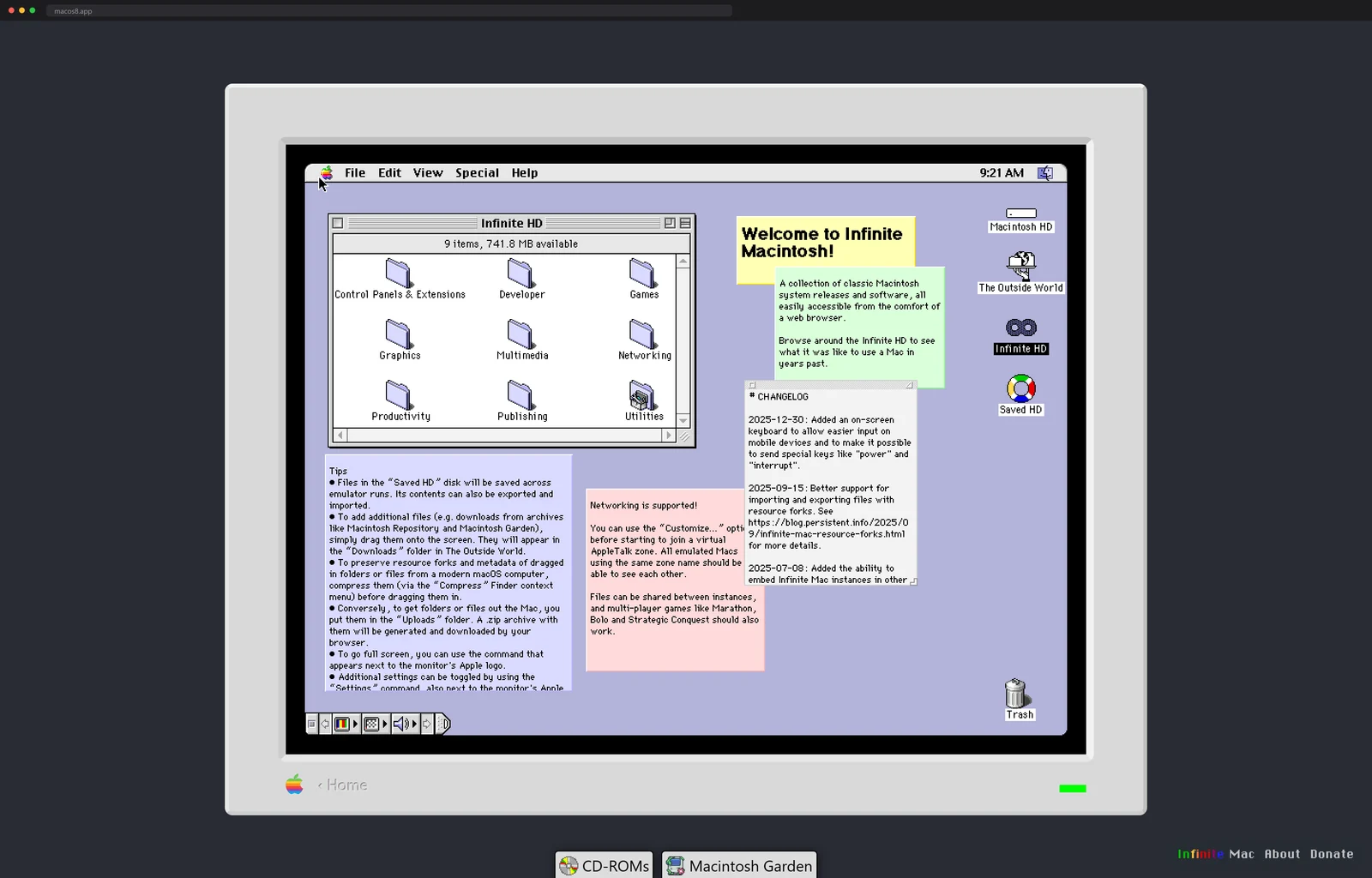
The tab loads and there it is, a full Mac OS 8 desktop, the platinum menu bar across the top, a hard-drive window open to folders named Games and Multimedia and Utilities, the clock reading some time in the late nineties. You can open programs. It is a Macintosh.
Infinite Mac, by Mihai Parparita, is a collection of classic Apple systems you boot straight from a link. The timeline runs from System 1.0 in 1984 all the way up through Mac OS X and even NeXTSTEP, dozens of releases in total, each one a real machine you can poke at instead of a slideshow of screenshots.
And boot means boot. The numbers in Parparita's launch writeup are a happy Mac on screen in about a second and a fully loaded desktop in three, on a cold cache. The physical machines never came close.
This is also not a finished museum piece. The repo dates to June 2021, carries 1,626 stars, and its latest commit landed the day before I wrote this sentence. Five years in and the thing is still growing new decades.
Seven emulators, one compiler
Here is how you get a Motorola 68K Mac running in a browser that has never heard of one. Infinite Mac takes the established Mac emulators, Mini vMac and Basilisk II for the 68K machines, SheepShaver and DingusPPC for the PowerPC era, PearPC for early Mac OS X, Previous for the NeXT hardware, plus the newer Snow, and compiles them all to WebAssembly with Emscripten. Seven cores in total, and the site picks the right one for whichever system you clicked. It is the same compiler that once squeezed Doom into a PDF file, here aimed at something gentler. Around the emulators sits a React and TypeScript app that draws the window chrome and the app library.
The disk story is the clever part. A period system folder plus a library of software would be a brutal download, so each disk image is chopped into fixed-size 256KB chunks, Brotli-compressed and named by their content. A service worker fetches a chunk from Cloudflare's storage the moment the emulated Mac reads that stretch of disk, with a little prefetching for sequential reads. You stream an operating system the way you stream a video.
There are quieter tricks underneath. An emulated CPU normally spins flat out doing nothing, so the emulator notices when the Mac goes idle and parks the thread on an Atomics wait, which lands the whole machine around 13 percent CPU while it sits there being 1996.
The detail that makes it feel alive is that files persist. Anything dropped in the Saved folder is written through to the browser's IndexedDB and survives between sessions, and you can drag a file in from your real desktop and watch it surface inside the emulated one. It is not a museum behind glass. It is a machine you can use.
There is even a side door for other sites: any of these machines embeds in an iframe, which is how a handful of retro-computing pages now boot an era-correct Mac next to the paragraph describing it. The URL is the whole API, system name and all.
The software library is its own archaeology. The disk images are assembled with a Python tool called machfs that speaks the old HFS format, filled from Internet Archive uploads and decompressed StuffIt archives, with Finder niceties like icon positions preserved on purpose.
Twenty thousand disks behind one search box
Then in late 2024 the library stopped being curated and became the whole archive. Parparita wired in the Macintosh Garden catalog, 20,000 applications and games searchable from inside the emulated Mac, each one loading with a single click on anything from System 7 through Mac OS 9.
The engineering aside in that post is my favorite kind of number. The Garden's full catalog came as 86 megabytes of JSON, 27 even after gzip, far too heavy to ship to a browser. His custom format gets the same catalog down to 439 kilobytes compressed, roughly a two-hundredth of the original, and search over it is a plain linear scan because at that size nothing fancier is worth it. A Cloudflare worker serves the details and streams big CD-ROM images by HTTP range request, so a full-size disc starts playing without fully downloading.
The timeline keeps growing at both ends
The Mac side was apparently not enough. In March 2024 the Previous emulator came aboard, the fifth core Parparita had ported at the time, and with it every notable NeXT release from the 0.8 preview of 1988 to OPENSTEP 4.2 in 1997. Those installs run to hundreds of megabytes per version, which is what pushed the disk chunks off Cloudflare's key-value store and into proper object storage.
A year later came the ascent into Mac OS X, the hardest climb documented on the blog. Getting 10.1 stable on DingusPPC came down to a single misbehaving floating-point bit in the emulated Machine State Register, the kind of bug you find by reading PowerPC manuals at night. The payoff numbers: 10.1 and 10.3 run well, 10.2 reaches a usable desktop in about two minutes, and in a checksum benchmark DingusPPC chewed through 100 megabytes in 13 seconds where PearPC needed 18.
The polish keeps arriving in small cuts too. September 2025 brought proper resource-fork import and export, December 2025 an on-screen keyboard, so you can now type into a 1984 Macintosh from a phone made forty-one years later.
Everything above comes from the repo and Parparita's blog, which documents each layer of the build as it happened. If the compile-anything-into-a-tab trick is the part that itches, the Emscripten tutorial takes you from a C file to a running page in an afternoon. Bring your own decade of Mac software.
The Apple side is not the only timeline preserved this way. PCjs does the same for the beige universe, the original 1981 IBM PC through Windows 95, plus DEC PDP-11 minicomputers and VT100 terminals, every one bootable in the tab. Between the two projects, most of personal computing's first two decades now runs in a browser.
More old computers with no hardware left: a full Linux box that runs with no server behind it.
Next up
The whole planet, drawn as columns of people