Machines
The datacenter in the hallway runs eighty-nine apps and opens no ports
Five nodes, two old laptops, a 3D-printed case, eighty-nine apps, zero open ports. This homelab writeup runs tighter ops than most companies I have worked near.
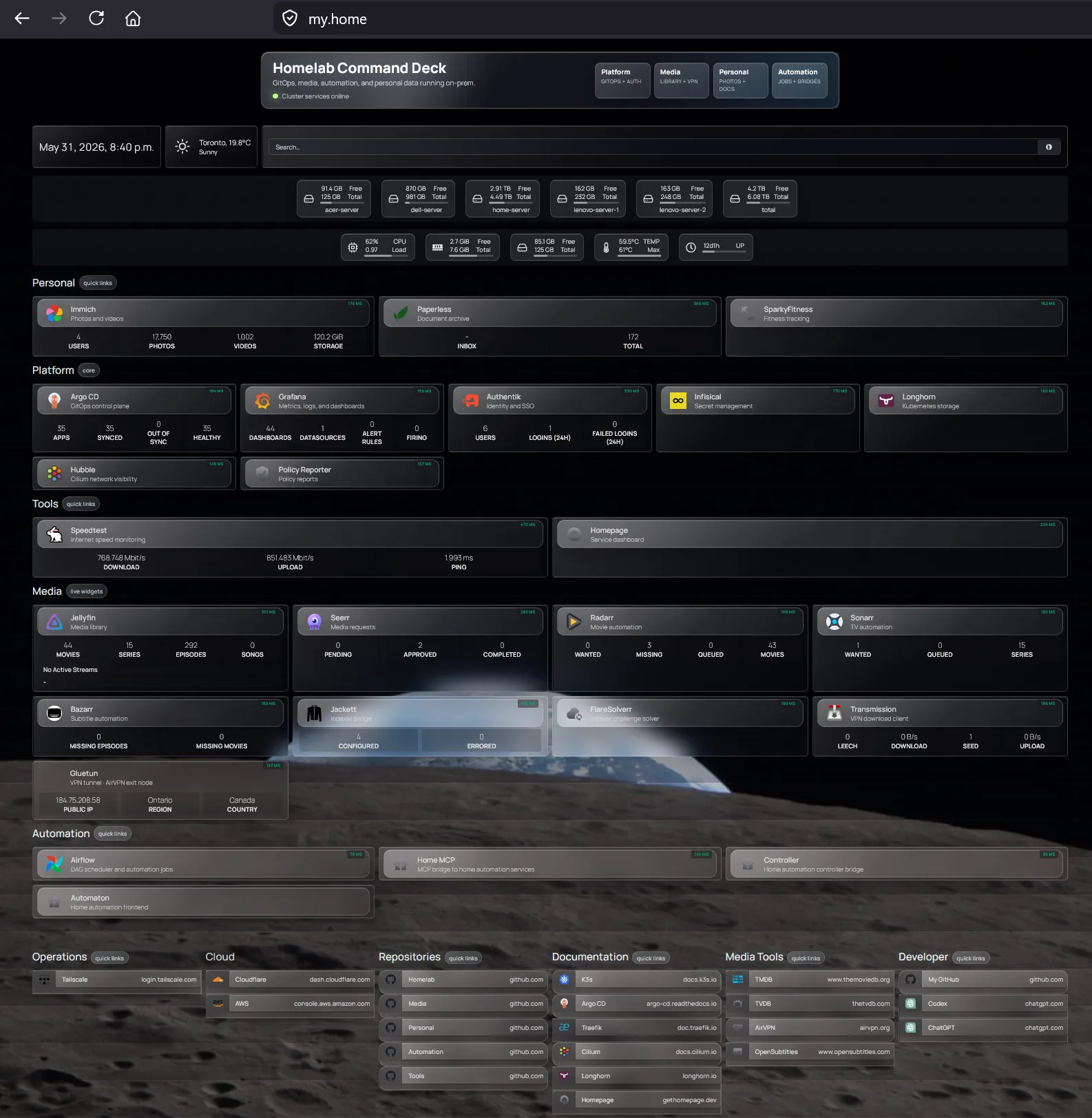
The most impressive machine I saw this month is not in a datacenter. It is in somebody's home, partly inside a case that came off a 3D printer, and its own dashboard counts eighty-nine applications with every workload showing Ready.
This k3s homelab writeup lays the whole thing out: a five-node Kubernetes cluster built from hardware that was headed for a recycling drawer. Two old laptops and a homemade server form the high-availability control plane, voting on quorum so the cluster survives any one of them dying, and they double as ingress. Two mini PCs sit underneath as the worker pool and carry the actual load.
High availability from junk is a funnier achievement than high availability from a rack. Laptops turn out to be sneaky good control-plane nodes, since each one ships with its own built-in UPS, the battery, and its own crash cart, the keyboard and screen. The cloud charges extra for both.
Eighty-nine apps, counted by category
The dashboard splits the eighty-nine into sixteen personal apps, fifty-eight platform services, eight media apps, five automation workloads, and two tooling apps.
Personal is the family's digital life: Immich for photos, Paperless-ngx for documents. Media is Jellyfin and its companion stack on the side. Automation is Airflow plus a bridge into Ziggy, the home assistant I covered in this house has a brain.
Each of those names is the self-hosted answer to a subscription you probably pay for. Immich is Google Photos without the upload, Paperless-ngx is a filing cabinet with OCR, Jellyfin is the streaming box. The dashboard reads less like a server list and more like a cancelled-subscriptions ledger.
Sit with that ratio for a second. Fifty-eight of the eighty-nine exist to run, secure, store, and watch the other thirty-one. Most of a serious platform is platform. This hallway knows it.
The writeup is candid about what all that machinery does on an average evening: it serves a movie and runs a couple of cron jobs. That gap between capability and nightly reality is the most homelab sentence ever written, and I mean that as praise. Nobody builds a five-node control plane because the movie needs it. You build it because the drawer of old laptops was right there and the alternative was letting them die unemployed.
Zero open ports, and one door for changes
Zero ports open to the internet. Every app sits behind TLS and a login, with single sign-on through Authentik. Certificates come from an internal CA via cert-manager, issued and renewed automatically for every .home domain, so none has ever expired because a human forgot.
Think about what that stack replaces. Most self-hosters bolt on HTTPS one service at a time, forget one renewal, and find out via a browser warning in front of a family member. Here a private certificate authority signs everything once, the household trusts that one root, and cert-manager re-issues on a schedule no human remembers. One login screen covers all eighty-nine apps, so the family password count is one.
Shipping a change is stricter than at most companies. Nothing gets kubectl-applied by hand, ever. Argo CD owns every workload through its app-of-apps pattern, synced from four repos split by namespace: tools, automation, media, personal. A change means a pull request. That is the only way in.
App-of-apps deserves a sentence of its own, because it is the trick that makes four repos feel like one machine. You declare a single parent application whose only job is to point at the other applications, and Argo CD recurses from there, so bootstrapping the whole cluster after a disaster is one apply instead of eighty-nine. The official Argo CD cluster bootstrapping docs walk through the pattern, including the warning that the parent app effectively holds admin keys, which is exactly why this cluster gates it behind pull requests.
Then the layers you normally meet at an enterprise platform team. Kyverno checks admission policy before a workload starts, with Policy Reporter showing what got blocked. Tetragon watches runtime behavior at the eBPF level, down to syscalls and process lineage, and network policy is enforced with eBPF too. Infisical holds the secrets and rotates them. Prometheus scrapes metrics, Loki aggregates every pod's logs, Grafana draws both, and Alertmanager pages on node health, sync failures, and certificates approaching expiry.
Tetragon is the one that made me look twice. It is a Cilium project with 5,048 GitHub stars that most engineers only meet when a security team installs it for them, hooked into the kernel so it can see every process a container spawns and every syscall it makes. Here it is watching a hallway. If Jellyfin ever decides to open a shell, somebody's phone will know before the movie finishes buffering.
Storage tradeoffs with prices attached
Longhorn replicates storage across the nodes: two copies for ordinary workloads, three for state that actually matters, like the Authentik and Infisical databases.
Replication is the honest tax of distributed storage: every gigabyte you keep twice costs two gigabytes of disk and a trip across the network on every write. On datacenter hardware nobody notices. On a hallway cluster strung together over home networking, the tax is real money and real latency, which is why the next two paragraphs exist.
And one deliberate exception, the detail I keep quoting at people. The 250-gigabyte photo library lives on a single-replica volume pinned to one node's disk, because replicating that much imagery three times over a home network buys the household nothing. The media library skips distributed storage entirely and streams off a directly mounted RAID 10 array, since Jellyfin does not need a distributed filesystem to play a movie.
Choices with reasons and prices written down. Rarer than the hardware.
The scene this hallway belongs to
Once I started pulling the thread, a whole community came with it. Hallway clusters are a genre now, with shared templates and their own search engine.
The template end is onedr0p's cluster-template, 2,817 stars of opinionated starting point that stands up a Talos Kubernetes cluster with Flux doing the GitOps instead of Argo CD. Same philosophy as the hallway: the repo is the cluster, and your hands never touch the API server directly.
The search engine is kubesearch.dev, which indexes the Helm releases that people in the self-hosting scene actually run, so before you write a config for Immich or Paperless-ngx you can read dozens of other people's. I went looking for a total count of indexed repos and the site does not print one, but the popular-releases page alone scrolls through hundreds of charts, most of them the exact apps on this hallway's dashboard.
That is the quiet superpower of this whole scene. The hallway cluster looks like a solo achievement, and the writeup is, but every chart in it has a few dozen strangers co-maintaining the path.
Where your own cluster starts
The writeup is the receipt, monitoring stack and all. The distribution underneath is k3s, a lightweight Kubernetes, and the official k3s quick-start guide gets a single node running with one shell command.
From there the ladder is visible in this very article. One k3s node teaches you pods. Adding a second teaches you why the hallway runs three control-plane voters instead of two, because quorum needs an odd number to break ties when a node dies. Longhorn teaches you replicated storage, and the first time you set a replica count you will face the same 250-gigabyte photo question this builder did, with your own answer.
Read the writeup, then look at the drawer of old hardware you were about to recycle. That drawer is a control plane now.
Next up
The studio reel that runs live in WebGL, with no video file