On the web
Escher's Print Gallery zooms forever in a shader
One WebGL fragment shader bends a flat drawing into the endless Escher spiral with log-polar coordinates and a rotation. It takes your own image and prints its source.
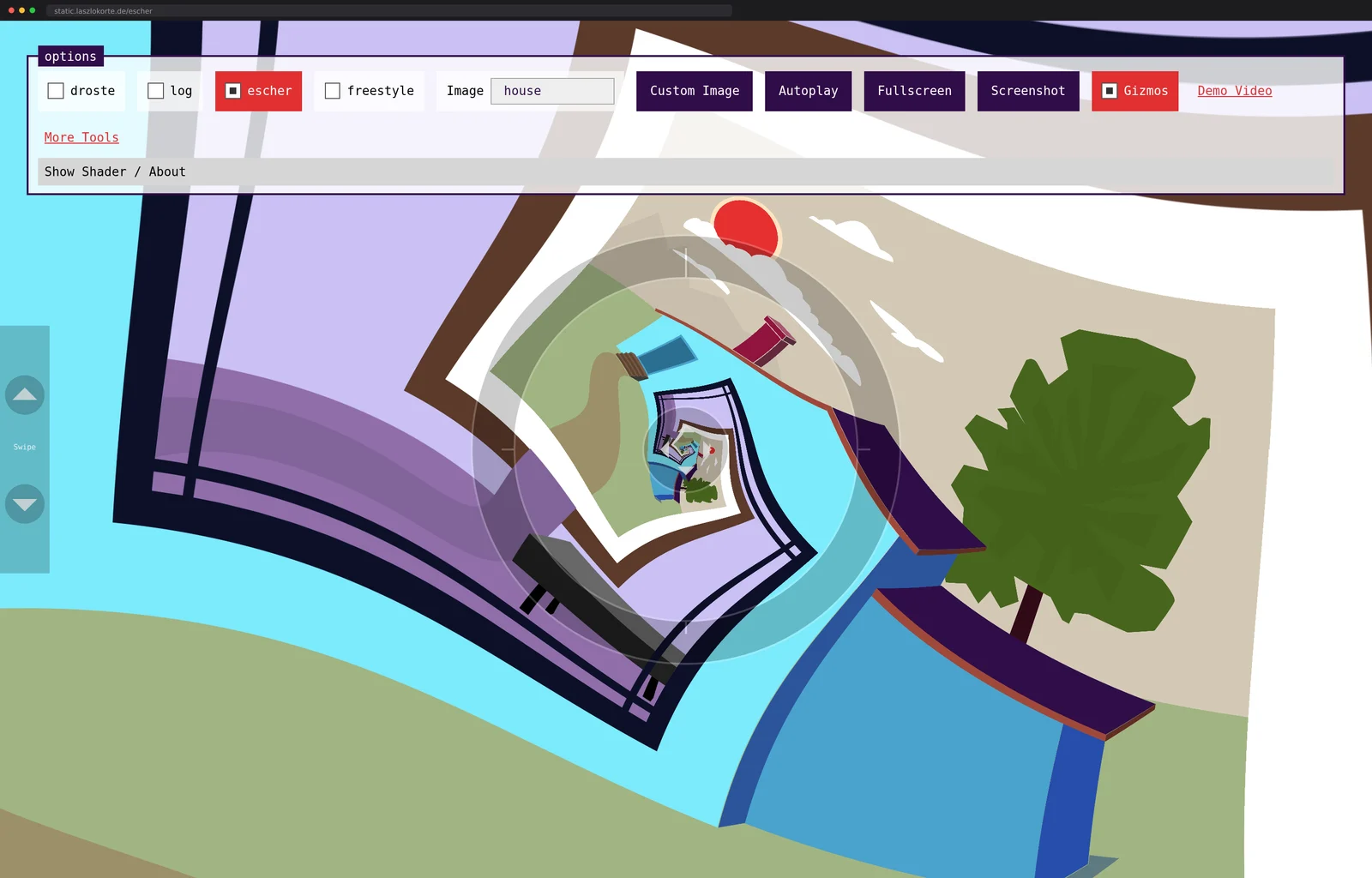
The drawing is eating itself. A tree, a red sun, a purple roof and a strip of green hill all curl toward a point near the middle of the screen, and inside that point is the same scene again, smaller and rotated, and inside that one is another. Hold the down arrow and the whole thing slides inward without a seam, no copy ever starting or ending, one picture coiling into itself.
This is the Escher shader by laszlokorte, and it loaded for me as a single page with a row of checkboxes: droste, log, escher, freestyle. The page is titled "M.C. Escher Print Gallery Shader", and I would have told you it was a video if the arrows were not live under my cursor.
What the four boxes do
The checkboxes are the explanation, in order, and I found that clicking through them is the fastest way to understand the trick.
Droste is the plain version: a picture that contains a smaller copy of itself, on and on, named after the cocoa tin that did it. Log shows the same picture after the coordinate change that makes the repetition visible. Escher turns on the rotation that makes the copies join into one spiral. Freestyle hands you the sliders and lets you break it. Four built-in images sit in the Image menu (house, grid, clock and a Firefox-logo Droste), and a Custom Image button takes your own.
The author's own account of how it came about is short. On Hacker News in April 2026, the Show HN post, which collected 176 points and 32 comments, says the latest 3Blue1Brown video on the Escher effect inspired a re-implementation as a WebGL fragment shader. That video is Grant Sanderson's "Escher's most mathematically interesting piece", posted 22 March 2026, which builds the Print Gallery transformation from conformal maps and the complex logarithm using the analysis of the mathematicians de Smit and Lenstra. The Show HN went up about two weeks after the video.
The build: go to polar, rotate, come back
The page has a "Show Shader / About" button, and pressing it prints the entire vertex and fragment shader, plus an explanation, on the page. No build step, no minified bundle to unpick. I read all of it.
The idea, in the author's own framing: a Droste image repeats as you move toward the center, and every repeat is the same picture at a fixed scale factor. Take the log of the distance from the center, and a scale factor becomes a plain distance. Concentric rings turn into straight rows. In that space, all the endless smaller copies sit as equal rows, one under another, which is why the picture looks periodic.
Escher's move was to stop the rows being separate. In that unrolled space you rotate everything a little, so one copy now runs diagonally across every row, and when you transform back to ordinary x and y the copies share every radius and angle. The seams are gone and the spiral is what is left. The author compares the pattern to the Fourier transform: go somewhere the problem is easy, do the easy thing, come back.
In the fragment shader that is about four lines of real work. It computes
log(length(uvCentered)) / log(zoomFactor) for the radius axis and
atan(uvCentered.y, uvCentered.x) / PI for the angle, rotates the pair by
a uniform called escherAngle, scales it by escherScale, then rebuilds
cartesian coordinates with cos, sin and exp. A helper named
rescale folds the result back into the source image's valid range with a
floor on a logarithm, so the same texture can be sampled at every scale.
The last line is a single texture2D lookup.
The one hard part, the author notes, is lining up the period of the spiral turn with the scale of the image. Get it wrong and you do not get a nicely wrong picture. You get a tear, because in a non-linear transform small errors in the angle become large ones across the frame.
I asked Laszlo Korte whether he found the right values by feel or worked
them out. By email, he said they come from the transformation itself: they
depend on the assumed scale, or period length, of the coordinate systems and
are independent of the zoom factor. In his implementation the values for a
continuous spiral are escherAngle = Math.atan2(0.5, 1) and
escherScale = Math.hypot(0.5, 1), about 0.46 radians and 1.12.
The stack, so you can search it: WebGL 1 (precision mediump float,
attribute, varying, texture2D), one vertex shader that handles
aspect ratio, pan, shear and rotation as uniforms, one fragment shader for
the maths, and the textures. The vertex shader is where the on-screen
gizmos land: drag the ring in the middle of the frame and you are changing
zoomCenter, sheer and rotation.
Why the sample images are vectors
The comment thread is where the most useful number turned up. Asked why the real Print Gallery is not included, the author answered that the images in the demo are vector graphics rasterized to your screen resolution on the fly, and that the Print Gallery "uses a zoom factor of 256 across the image (vs 16 for my images)".
So it is a sampling problem, not a licensing one. At a factor of 16 each ring is sixteen times smaller than the last, and one can render the source at a sensible size and zoom a long way. At 256 the picture would need to stay sharp across a span roughly sixteen times larger in linear terms, which is more than any single texture will hold.
The author's list of how others got around it is worth taking. One route is vectorizing the print. The other is rebuilding the scene as a 3D signed distance field and ray marching it, which the author points to in a Shadertoy and describes as giving the best result, while saying that they did not want to copy it. I opened that page in my browser and it loads; I did not read through it, so take the description as the author's.
A second thing from the same thread: an upload feature is hard because the shader needs to know where the smaller copy of your image sits inside it. For the built-in pictures that is fixed. For a random photo it is not, and that is why the Custom Image button is a feature with conditions rather than a free-for-all.
What the thread improved
The Show HN is a decent lesson in shipping fast. The first version hid the Escher effect behind a checkbox, and a commenter pointed out that on a large monitor it was easy to miss. The author changed the default so the effect showed on load, then added a slow initial auto-zoom and made the up and down arrows work while held down. Someone else noted the mouse wheel already worked. Mobile is the rough edge: a user reported pinch-to-zoom breaking in Chrome and grainy edges on Firefox, and the author said multi-touch was not implemented and that the gizmos were the way in.
I tested it on a desktop only, and I would use the gizmos or the wheel, not a fingertip.
The door
Three places to go from here, in the order I would take them.
Start with Sanderson's video page if you want the mathematics behind the checkboxes; the post describes it as one of the most involved videos on his channel, and it teaches the complex logarithm from zero. Then open the shader panel on the demo and read the fragment shader against it, because that is about the shortest route from "complex logarithm" to code I know of.
Third, the HN thread links a few siblings: a canvas-drawn Escher tower by Bewelge, and a commenter pointing to the 2002 University of Leiden Droste site, which had since gone offline and survives on the Wayback Machine.
Then go and break something with Freestyle. The seam is the interesting part.
Next up
A student's gravity engine keeps 6,000 bodies at 60 Hz